The SanDisk Extreme PRO SD UHS-II USB-C Reader/Writer is the best SanDisk card reader for MicroSD cards, offering exceptional speed and broad compatibility. This reader is ideal for professionals due to its UHS-II support, delivering read speeds up to 312MB/s. Selecting the right card reader is crucial for efficient data transfer and managing your MicroSD card content, especially with modern high-speed cards.
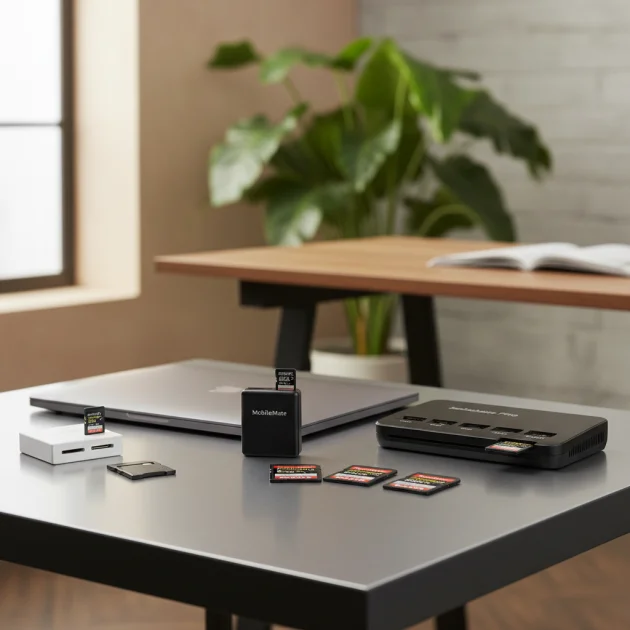
Quick comparison
| Model | Interface | Max Speed | Key Feature |
|---|---|---|---|
| SanDisk Extreme PRO SD UHS-II USB-C Reader/Writer | USB-C | UHS-II | High-speed for professionals |
| SanDisk ImageMate PRO USB-C Multi-Card Reader/Writer | USB-C | UHS-II | Versatile multi-card support |
| SanDisk MobileMate USB 3.0 MicroSD Card Reader | USB-A 3.0 | UHS-I | Compact and portable |
What MicroSD Cards Need from a Card Reader
MicroSD cards require a card reader that can match their speed capabilities to avoid bottlenecks during data transfer. Modern MicroSD cards, especially those rated UHS-I or UHS-II, can achieve significantly higher read and write speeds than older USB 2.0 readers can handle. A compatible reader with a USB 3.0 or USB-C interface is essential to fully utilize these speeds, ensuring quick transfers of large files like 4K video or high-resolution photos. The reader should also offer reliable connectivity and robust construction to protect both the card and the data. Look for readers that support the latest UHS standards to future-proof your setup. Additionally, some MicroSD cards come with adapters for standard SD card slots, so a reader that accommodates both formats can be more versatile. The physical design, such as a secure slot and durable casing, also contributes to the overall user experience and longevity of the device. For compare top reviews on this site.
Detailed Reviews
SanDisk Extreme PRO SD UHS-II USB-C Reader/Writer
The SanDisk Extreme PRO SD UHS-II USB-C Reader/Writer is engineered for professionals demanding the fastest possible data transfers. This reader fully supports UHS-II SD cards, delivering read speeds up to 312MB/s and write speeds up to 260MB/s, making it ideal for photographers and videographers working with large files. Its USB-C interface ensures compatibility with modern laptops and desktops, providing a direct and efficient connection. The compact design makes it highly portable, fitting easily into any camera bag or laptop case. While primarily designed for full-size SD cards, its UHS-II capabilities are directly relevant for MicroSD cards when used with a high-speed adapter, ensuring that even the fastest MicroSD cards can perform at their peak. The build quality is robust, typical of SanDisk’s professional line, ensuring durability and reliable performance over time.
SanDisk ImageMate PRO USB-C Multi-Card Reader/Writer
The SanDisk ImageMate PRO USB-C Multi-Card Reader/Writer is a versatile solution for users with various memory card types, including MicroSD. It features a USB-C interface and supports UHS-II speeds for SD and MicroSD cards (via adapter), as well as CompactFlash cards. This multi-format capability makes it an excellent choice for those who frequently switch between different cameras or devices. The reader boasts impressive transfer speeds, allowing for quick offloading of photos and videos. Its sturdy construction and sleek design make it a reliable and aesthetically pleasing addition to any workspace. The ImageMate PRO is particularly beneficial for users who need a single reader to handle multiple card formats without compromising on speed or reliability, ensuring efficient workflow for all their digital media.
SanDisk MobileMate USB 3.0 MicroSD Card Reader
The SanDisk MobileMate USB 3.0 MicroSD Card Reader is designed for ultimate portability and convenience. This compact reader plugs directly into a USB-A 3.0 port, offering fast data transfers for UHS-I MicroSD cards. Its small form factor makes it perfect for on-the-go use, easily fitting into a pocket or attached to a keychain. Despite its size, it delivers reliable performance, significantly faster than older USB 2.0 readers. It’s an excellent choice for quickly transferring files from your smartphone, drone, or action camera to your computer. The MobileMate is a straightforward, plug-and-play device that requires no additional drivers, making it incredibly user-friendly. For users who prioritize portability and simplicity for their MicroSD card needs, this SanDisk reader is an outstanding option.
Routine Fit
Choosing the right SanDisk card reader for your MicroSD cards depends heavily on your daily routine and specific use cases. If you are a professional photographer or videographer constantly transferring large files from high-speed MicroSD cards, the SanDisk Extreme PRO SD UHS-II USB-C Reader/Writer or the ImageMate PRO will be indispensable due to their superior speed and multi-card support. For casual users who primarily transfer photos and videos from their phone or drone, the compact and convenient SanDisk MobileMate USB 3.0 MicroSD Card Reader offers an ideal balance of speed and portability. Consider your device’s available ports (USB-A vs. USB-C) and the frequency of transfers to select a reader that seamlessly integrates into your workflow, ensuring efficient and hassle-free data management.
FAQs
What is the difference between UHS-I and UHS-II card readers?
UHS-I (Ultra High Speed-I) and UHS-II (Ultra High Speed-II) refer to different speed classes for SD and MicroSD cards and their corresponding readers. UHS-I cards have a single row of pins and can achieve theoretical speeds up to 104 MB/s. UHS-II cards feature an additional row of pins, allowing for significantly faster theoretical speeds up to 312 MB/s. A UHS-II card reader is required to utilize the full speed potential of a UHS-II card. While a UHS-II card will work in a UHS-I reader, it will operate at UHS-I speeds only. For optimal performance with high-speed MicroSD cards, a UHS-II compatible reader is essential.
Can I use a SanDisk SD card reader for MicroSD cards?
Yes, you can typically use a SanDisk SD card reader for MicroSD cards, provided you have a MicroSD to SD adapter. Most MicroSD cards come with such an adapter, which allows them to fit into standard SD card slots. When inserted into the adapter, the MicroSD card functions identically to a full-size SD card. Therefore, any SanDisk card reader designed for SD cards will be able to read and write to your MicroSD card when it’s placed in an adapter. Ensure the reader’s speed capabilities match or exceed those of your MicroSD card for the best performance.
Are SanDisk card readers compatible with all operating systems?
SanDisk card readers are generally designed for broad compatibility with major operating systems, including Windows, macOS, and Linux. They are typically plug-and-play devices, meaning they do not require specific drivers to be installed. Modern SanDisk readers, especially those with USB 3.0 or USB-C interfaces, adhere to universal standards that ensure seamless operation across different platforms. While specific features or bundled software might be optimized for certain OS versions, the core functionality of reading and writing to MicroSD cards remains consistent. Always check the product specifications for any specific OS requirements if you are using an older or less common operating system.
What factors should I consider when choosing a SanDisk MicroSD card reader?
When choosing a SanDisk MicroSD card reader, several factors are crucial. First, consider the speed of your MicroSD cards; if you have UHS-II cards, you’ll need a UHS-II compatible reader to maximize transfer speeds. Second, evaluate the interface: USB-C offers the fastest and most modern connectivity, while USB-A 3.0 is still very capable. Third, think about portability; compact readers like the MobileMate are great for travel. Fourth, consider versatility; if you use other card types, a multi-card reader like the ImageMate PRO might be beneficial. Finally, assess the build quality and durability for long-term reliability.
How does a card reader affect MicroSD card performance?
A card reader significantly impacts MicroSD card performance, primarily in terms of data transfer speeds. If your card reader has a slower interface (e.g., USB 2.0) or doesn’t support the speed class of your MicroSD card (e.g., a UHS-I reader with a UHS-II card), it will create a bottleneck. This means your MicroSD card will not be able to achieve its maximum read and write speeds, resulting in slower file transfers. Conversely, a high-speed card reader that matches or exceeds your MicroSD card’s capabilities will allow for optimal performance, ensuring quick and efficient data management. The reader acts as the conduit, and its capabilities directly influence how fast data can flow to and from your card.
Verdict
For users seeking the absolute best SanDisk card reader for MicroSD cards, the SanDisk Extreme PRO SD UHS-II USB-C Reader/Writer stands out for its unparalleled speed and professional-grade performance. However, the SanDisk ImageMate PRO USB-C Multi-Card Reader/Writer offers excellent versatility for those managing multiple card formats, while the SanDisk MobileMate USB 3.0 MicroSD Card Reader provides an ideal balance of portability and speed for everyday use. Ultimately, the best choice depends on your specific needs, whether it’s raw speed for professional workflows, multi-card compatibility, or compact convenience for on-the-go transfers. Each SanDisk option delivers reliable performance, ensuring your MicroSD card data is handled efficiently.
Frequently Asked Questions
What is the difference between UHS-I and UHS-II card readers?
UHS-I cards achieve theoretical speeds up to 104 MB/s with a single row of pins, while UHS-II cards feature an additional pin row for speeds up to 312 MB/s. A UHS-II card reader is necessary to fully utilize the faster speeds of UHS-II cards. While a UHS-II card works in a UHS-I reader, it will operate at the slower UHS-I speeds.
Can I use a SanDisk SD card reader for MicroSD cards?
Yes, you can use a SanDisk SD card reader for MicroSD cards if you have a MicroSD to SD adapter, which most MicroSD cards include. The adapter allows the MicroSD card to fit into standard SD card slots, functioning identically to a full-size SD card. Ensure the reader's speed capabilities match or exceed your MicroSD card for optimal performance.
Are SanDisk card readers compatible with all operating systems?
SanDisk card readers are generally compatible with major operating systems like Windows, macOS, and Linux, functioning as plug-and-play devices without requiring specific drivers. Modern SanDisk readers with USB 3.0 or USB-C interfaces adhere to universal standards for seamless operation across platforms. Always check product specifications for any specific OS requirements.
What factors should I consider when choosing a SanDisk MicroSD card reader?
When choosing a SanDisk MicroSD card reader, consider your MicroSD card's speed (UHS-II needs a compatible reader), the interface (USB-C for fastest connectivity), portability needs (compact readers for travel), and versatility (multi-card readers for various card types). Also, assess the build quality for long-term reliability.
How does a card reader affect MicroSD card performance?
A card reader significantly impacts MicroSD card performance by influencing data transfer speeds. A slower interface, such as USB 2.0, or a reader that doesn't support your MicroSD card's speed class (e.g., a UHS-I reader with a UHS-II card) will create a bottleneck, reducing transfer speeds. A high-speed reader that matches or exceeds your card's capabilities ensures optimal performance and efficient data management.
Get our weekly buyer guide
Practical specs, not advice. Unsubscribe anytime.
This post really helped me understand why matching the card reader to the microSD card’s speed capabilities is so important. I was experiencing bottlenecks with my old reader, but after getting the SanDisk Extreme PRO, my data transfers are lightning fast. It’s perfect for handling my high-resolution photos and 4K video files without any lag.
The SanDisk MobileMate USB 3.0 MicroSD Card Reader is super compact and convenient for travel, which I appreciate. However, I found that the USB-A 3.0 interface is a bit of a drawback since most of my newer devices are USB-C. It works fine, but I wish it had a USB-C option for better compatibility with my laptop.
I picked up the SanDisk ImageMate PRO USB-C Multi-Card Reader/Writer because I deal with various card types, not just microSD. It’s really versatile and handles everything I throw at it with decent speed. The build quality feels solid, and it’s great to have one reader that covers all my bases without needing multiple dongles.
I recently upgraded to the SanDisk Extreme PRO SD UHS-II USB-C Reader/Writer, and it’s been a game-changer for my workflow. The read speeds are incredible, especially with my UHS-II cards. Transferring large video files from my drone’s microSD card is now so much faster, which saves me a ton of time during editing. Definitely worth the investment for professionals.